🔍 CNN Kernels & Filters
Machine Learning Made Simple
3-Minute Complete Guide
🤔 What are Kernels & Filters?
A kernel (or filter) is a small matrix that slides across an image to detect specific features like edges, corners, or textures.

Kernel sliding across image performing convolution
Think of kernels like specialized magnifying glasses: Imagine you have different magnifying glasses, each designed to spot specific things. One highlights horizontal lines, another finds vertical edges, and another detects corners. That's exactly what CNN kernels do - each one is trained to find different patterns!
Why kernels work: Instead of looking at individual pixels, kernels examine neighborhoods of pixels together. This lets them detect meaningful patterns like "this area has a strong vertical edge" or "this region is blurry."
kernel = [[-1, -1, -1],
[-1, 8, -1],
[-1, -1, -1]]
🔍 Key Terminology: Stride, Padding & More

Different stride values change how the kernel moves
Stride - How Big Steps the Kernel Takes:
Stride = 1: Kernel moves 1 pixel at a time (detailed scan)
Stride = 2: Kernel jumps 2 pixels (faster, smaller output)
Think of stride like walking vs. running - bigger strides cover ground faster but miss some details!
Padding - Adding Borders:
No Padding: Output gets smaller than input
Same Padding: Add zeros around edges to keep same size
It's like adding a frame around a photo to preserve the original dimensions!
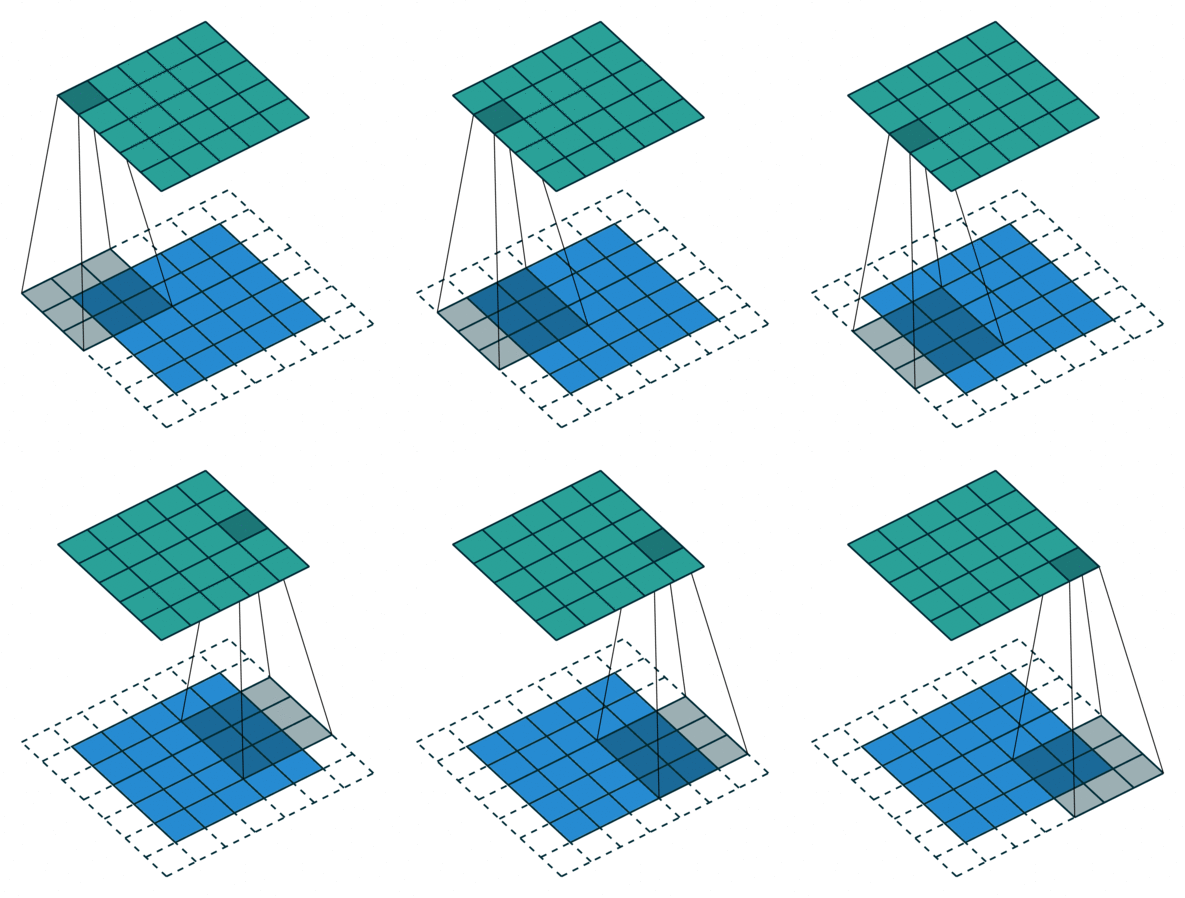
Padding preserves spatial dimensions
Dilation - Spreading Out the Kernel:
Dilation adds spaces between kernel elements, letting you see a wider area without more parameters. It's like using a wider-angle lens on your magnifying glass!
output_size = (input_size - kernel_size + 2*padding) / stride + 1
# Example: 28x28 input, 3x3 kernel, stride=1, padding=1
output = (28 - 3 + 2*1) / 1 + 1 = 28x28
🚀 Common Filter Types & Their Magic
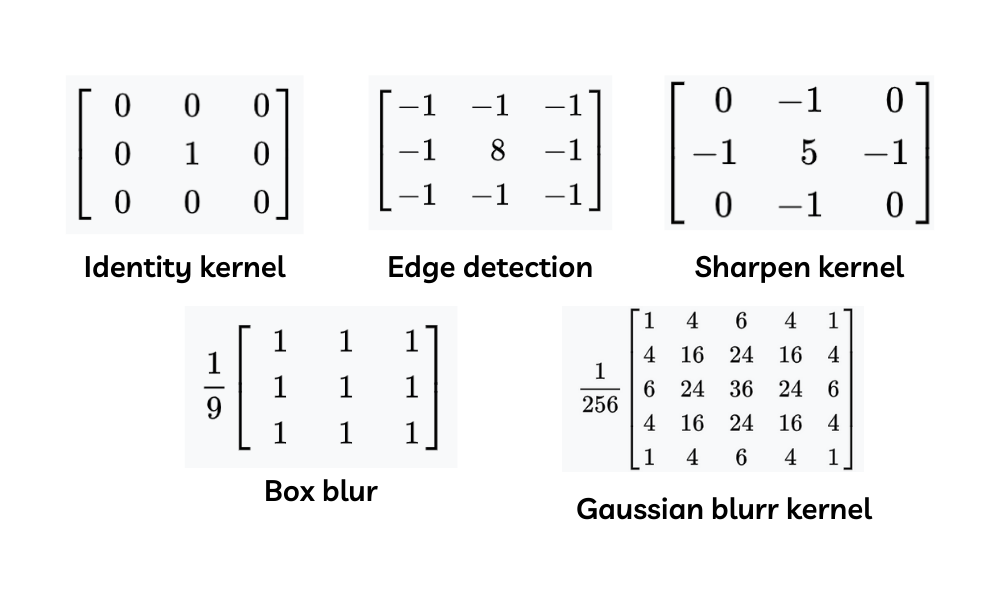
Different kernels detect different features
Edge Detection Filters: These are like outline detectors. They highlight boundaries between different regions in an image.
Blur Filters: These smooth out details by averaging neighboring pixels. Think of them as the "soft focus" effect in photography!
Sharpen Filters: These enhance edges and details, making images look crisper. They're the opposite of blur filters!
edge_filter = [[-1, -1, -1],
[-1, 8, -1],
[-1, -1, -1]]
blur_filter = [[1/9, 1/9, 1/9],
[1/9, 1/9, 1/9],
[1/9, 1/9, 1/9]]
sharpen_filter = [[ 0, -1, 0],
[-1, 5, -1],
[ 0, -1, 0]]
💡 Receptive Field & Practical Tips
🎯 Receptive Field - How Much Each Neuron "Sees":
- Layer 1: Sees 3x3 pixels (local features like edges)
- Layer 2: Sees 5x5 pixels (combines edges into shapes)
- Layer 3: Sees 7x7 pixels (recognizes objects)
- Deeper layers: See larger areas, detect complex patterns
🎯 Quick Implementation:
import tensorflow as tf
model = tf.keras.Sequential([
tf.keras.layers.Conv2D(32, (3,3), strides=1, padding='same'),
tf.keras.layers.Conv2D(64, (3,3), strides=2, padding='valid'),
tf.keras.layers.Conv2D(128, (5,5), strides=1, padding='same'),
tf.keras.layers.GlobalAveragePooling2D(),
tf.keras.layers.Dense(10, activation='softmax')
])
# 32, 64, 128 = number of different filters
# (3,3), (5,5) = kernel sizes
# strides = how big steps the kernel takes
# padding = 'same' keeps size, 'valid' shrinks